A red light on an EV wallbox can stop a charging session without explaining why. The color may indicate a failed self-test, communication problem, ground-fault protection event, overheating, or a locked connector. That uncertainty makes diagnosis important. Guessing can waste money, and resetting repeatedly can hide a developing fault.
This guide explains How to fix a red light error on an EV wallbox through practical, low-risk checks. Tom Moloughney, an EV charging specialist and author, offers a useful principle: “Look at the evidence before replacing hardware.” Start with the wallbox display, mobile app, and user manual. Record the exact light pattern. A steady red light may mean something different from a flashing red light. Small details matter.
Check whether the charging cable is fully inserted. Inspect the plug for moisture, dirt, bent pins, or visible damage. Confirm that the vehicle is unlocked and accepting a charge. If the wallbox feels unusually hot, stop using it. Do not open the enclosure or touch internal wiring. A qualified electrician should handle supply-side testing, residual-current faults, breaker problems, and installation defects.
The simple reset sometimes works. It is not a complete diagnosis. Turn the unit off only through its approved isolator or control method, then follow the manufacturer’s restart procedure. If the red light returns, note the time, weather, vehicle model, and error code. These details help technical support identify patterns faster. Even experienced owners can miss an obvious cause. That is why a careful record remains more reliable than a confident guess.
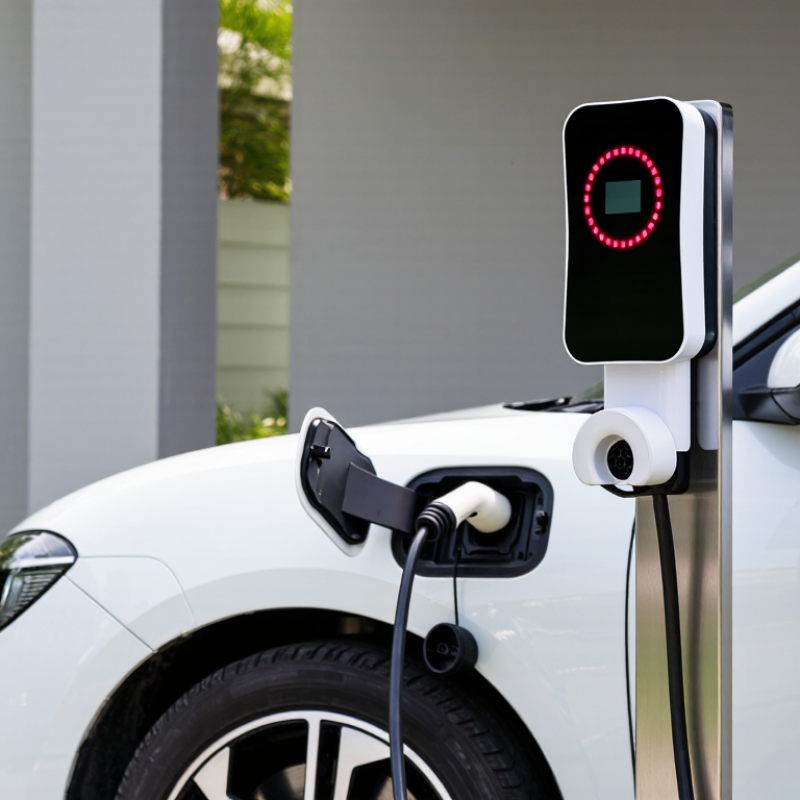
How to Fix a Red Light Error on an EV Wallbox?
Understanding What the Red Light Means on an EV Wallbox
A red light usually signals a fault, but its meaning differs between wallbox models. Solid red may indicate a failed self-check, while flashing red can show communication, grounding, or temperature problems. The color code is not universal. IEC 61851 defines charging communication and safety requirements, but manufacturers often create their own LED patterns. Check the unit’s manual before touching cables. According to the IEA Global EV Outlook 2024, more than 14 million electric cars were sold globally in 2023. Reliable home charging now matters to millions of drivers.
Start with simple observations. Stop the charging session and unplug the vehicle safely. Inspect the connector for moisture, dirt, bent pins, or visible damage. Check whether the wallbox feels unusually hot. Then switch off its dedicated circuit breaker for five minutes, restore power, and reconnect the cable firmly. A reset can clear a temporary fault. It can also hide a recurring problem. NREL’s Q1 2024 charging infrastructure report recorded about 180,000 public charging ports in the United States, showing how quickly charging equipment is expanding. More equipment also means more varied fault conditions. If the red light returns, record its exact pattern and any screen message. Do not repeatedly reset the unit. Contact a qualified electrician when the breaker trips, burning smells appear, or the fault remains after inspection.
A red status light usually indicates that the wallbox has detected a fault, but the exact meaning depends on the model. The chart below shows the nominal IEC 61851 Control Pilot voltage states used to identify the vehicle connection and charging condition.
How to use this information: Unplug the vehicle, check the charging connector and cable for damage or moisture, verify the electrical supply and ground connection, then restart the wallbox. If the red light remains on, record the displayed error code and contact a qualified electrician or the wallbox service provider.
A red indicator usually signals a fault, but its meaning differs between wallbox models. Check the user manual before touching anything. The IEA’s Global EV Outlook 2024 reported nearly 14 million electric cars sold worldwide in 2023. More vehicles mean more charging equipment under daily stress. A simple power check matters.
Look at the distribution-board breaker and residual-current device. If either has tripped, switch it off fully, then restore power once. Do not keep resetting it. Check for a loose plug, damaged insulation, bent pins, or moisture around the charging connector. The cable should sit firmly in the socket, with no sharp bends or hot plastic. Stop charging immediately if you notice burning smells, crackling, or unusual heat.
Connection problems can hide inside the unit. Do not remove its cover. A qualified electrician should verify terminal tightness, earthing, supply voltage, and protective-device operation. IEC 61851 charging guidance emphasizes controlled communication and protective measures between the vehicle and charging equipment. That small red light may reflect a failed safety check, not a dead charger.
I used to treat warning lights too quickly as equipment failure. That assumption can waste time. Check the car and cable as well. Try another approved cable only when it is dry and undamaged. If the light returns, record its pattern and contact certified service support. Guessing is not maintenance.
A red light on an EV wallbox usually signals a fault, not a charging delay. Check the indicator pattern first. A steady red light may mean a detected error, while a flashing red light can indicate communication, temperature, or protection problems. Meanings vary by model, so read the unit’s status chart before touching the cable. The International Energy Agency reported more than 4 million public charging points worldwide in 2023, with networks growing by over 40%. Reliable status monitoring is becoming essential as charging equipment expands.
Stop the charging session from the vehicle or control panel. Remove the connector only when the vehicle shows that charging has ended. Switch off the dedicated circuit safely, wait about 60 seconds, then restore power. Watch the sequence: a normal startup often shows a brief self-check, followed by standby or ready status. A damp connector, loose plug, blocked ventilation opening, or overheated cable can trigger another red light. I once assumed every red indicator required a hard reset. That shortcut was wrong. The fault returned because airflow around the enclosure was restricted.
Do not open the wallbox or bypass its protection devices. IEC 61851 requires defined control states between the vehicle and charging equipment, so abnormal indicators should not be ignored. The U.S. Department of Energy’s Alternative Fuels Data Center also emphasizes inspection, maintenance, and safe electrical installation for charging equipment. Record the light pattern, temperature, cable condition, and reset time. If the red light remains, contact a qualified electrician and provide those details.
A red light on an EV wallbox does not always mean hardware failure. Start by checking whether the vehicle supports the wallbox’s connector and current type. Some cars accept alternating-current charging only within specific power limits. A mismatch can stop charging before energy flows. Confirm that the vehicle is in Park, unlocked, and ready to charge. Small details matter.
Inspect the charging settings in the vehicle menu. Set a temporary charging schedule that begins immediately. Delayed charging can look like a wallbox fault. Also check the maximum charging current, battery protection limit, and location-based preferences. Some vehicles remember settings for each parking location. If the battery is nearly full, charging may pause normally. The display should help distinguish this condition from an error.
At the wallbox, make sure the cable is fully inserted and free from moisture, dirt, or visible damage. Try another compatible cable only if one is available and approved for the vehicle. I was wrong at first. I once blamed the wallbox, but a scheduled-charge setting caused the red light. That mistake showed me why settings deserve careful checking. If the red indicator remains after compatibility and configuration checks, record any displayed code and contact a qualified technician. Do not open the enclosure or bypass its safety controls.
| Indicator or Symptom | Likely Area to Inspect | Practical Check | Recommended Action | Safety Priority |
|---|---|---|---|---|
| Red light appears as soon as the cable is connected | Vehicle compatibility or connector type | Confirm that the vehicle and wallbox use the same compatible AC charging connector and communication standard. | Use the vehicle manufacturer’s approved charging equipment or a correctly rated adapter where permitted. | High |
| Red light occurs after charging starts | Charging current, supply voltage, or protective device | Check whether the electrical supply is stable and whether a circuit breaker or residual-current device has tripped. | Reset a tripped protective device only once if safe to do so. Repeated trips require a qualified electrician. | High |
| Vehicle does not begin charging | Charging schedule or delayed-start setting | Review the vehicle’s scheduled charging, departure time, minimum charge level, and off-peak settings. | Disable the schedule temporarily and select immediate charging to test the connection. | Medium |
| Charging stops when a power limit is applied | Current limit or load-management setting | Compare the wallbox current limit with the circuit rating and the vehicle’s maximum AC charging current. | Set a permitted current level that does not exceed the dedicated circuit or installation rating. | High |
| Red light appears with a loose or intermittent connection | Cable, plug, or socket seating | Stop charging, disconnect the cable, and inspect for dirt, moisture, bent contacts, cracks, or incomplete insertion. | Clean and dry external surfaces only. Replace damaged cables or connectors; do not use them while damaged. | High |
| Wallbox remains red after the vehicle is unplugged | Temporary control or communication fault | Wait briefly, then perform the reset procedure specified in the wallbox manual. | Restart the unit using its approved controls. Avoid repeatedly switching the circuit off and on. | Medium |
| Error occurs only during cold or hot conditions | Temperature protection | Check whether the vehicle inlet, cable, or wallbox is exposed to abnormal heat, freezing conditions, or blocked ventilation. | Allow the equipment to return to a suitable operating temperature and keep ventilation openings clear. | High |
| Charging is blocked after authentication | Access control or user authorization | Check whether charging requires an enabled user account, access card, application authorization, or local approval. | Complete authorization and verify that the selected charging mode is available to the user. | Medium |
| Red light returns after a reset | Persistent installation or equipment fault | Record the light pattern, error message, time of failure, and whether the issue happens with another compatible vehicle. | Contact the installer or qualified service provider with the recorded diagnostic details. | High |
| Burning smell, smoke, heat damage, sparking, or unusual noise | Electrical or mechanical damage | Stop using the wallbox immediately and keep people away from visibly damaged equipment. | Isolate power only if it can be done safely. Contact a qualified electrician or emergency service for an immediate assessment. | Critical |
How to Fix a Red Light Error on an EV Wallbox?
A red light usually signals a fault, not a minor display issue. The cause may involve the power supply, charging cable, vehicle connection, or internal protection system. Check the vehicle manual and wallbox indicators first. Then stop charging if the light remains red, especially with heat, burning smells, buzzing, or repeated tripping.
Do not remove the cover or touch internal wiring. A qualified wallbox technician can test voltage, grounding, insulation, and communication faults with calibrated equipment. Ask for proof of electrical qualifications and relevant charging-system experience. A reliable technician should explain the fault clearly, record test results, and provide a written repair estimate. They should also inspect the cable and socket for cracks, moisture, or discoloration. I used to think a reset solved most problems, but repeated resets can hide a developing electrical fault.
Tips: Take a photo of the red indicator and note when it appeared. Record the vehicle model, charging time, weather, and any error message. A short video can help the technician identify flashing patterns. Never continue charging just because the light disappears briefly. If the charger is hot or smells unusual, switch off the supply only if it is safe and accessible, then contact a qualified professional. When uncertain, stop.
It usually indicates a fault, not a normal charging delay. A steady light may show an error. A flashing light may involve communication, temperature, or protection problems. Meanings vary by model.
Stop charging from the vehicle or control panel. Remove the connector after charging ends. Switch off the dedicated circuit only if it is safe. Wait about 60 seconds, then restore power. Watch the startup sequence.
The cause may still be present. Check for a damp connector, loose plug, blocked vents, or an overheated cable. Restricted airflow can keep the fault active. I once blamed the reset process. The blocked ventilation was the real issue.
Yes. A delayed charging schedule may look like a wallbox failure. Set charging to begin immediately for testing. Check the vehicle’s current limit, battery protection setting, and location preferences. A nearly full battery may pause charging normally.
Confirm that the vehicle supports the connector and current type. Check its maximum AC charging limit. Make sure the vehicle is in Park, unlocked, and ready. Insert the cable fully. It should be dry and undamaged.
Try another cable only when it is compatible and approved. Inspect both connectors for moisture, dirt, cracks, or discoloration. Do not force the plug. Small damage matters.
Stop when the red light remains with heat, burning smells, buzzing, or repeated circuit trips. Do not continue charging because the light briefly disappears. If safe, switch off the supply. Then contact a qualified professional.
Provide a photo or short video of the indicator pattern. Record the error message, vehicle model, charging time, weather, and temperature. Note the cable condition and reset time. These details can reveal intermittent faults. I underestimated that evidence once.
No. Do not remove the cover or bypass protection devices. Internal testing may involve voltage, grounding, insulation, and communication checks. A qualified technician should use calibrated equipment. Ask for qualifications, test results, and a written repair estimate.
A red light on an EV wallbox usually indicates that the unit has detected a fault, interrupted power, or entered a protective mode. To understand the problem, first check whether the light is steady or flashing and consult the wallbox status guide. Safely inspect the power supply, circuit protection, plug, socket, and charging cable for loose connections, visible damage, moisture, or overheating. Do not use damaged equipment.
If the connections appear safe, stop the charging session, disconnect the vehicle, and reset the wallbox according to its instructions. Review the status indicators again after restarting. You should also confirm that the vehicle is compatible with the wallbox, the connector is fully inserted, and the charging schedule or current settings are correct. If the red light remains, the unit becomes unusually hot, or you notice electrical damage, stop using it and contact a qualified wallbox technician. These steps explain how to fix a red light error on an EV wallbox safely and systematically.

VoltNode Charger